Test Deployment Failing Yarn Lockfile
Last updated by: Mouse933, Last updated on: 16/05/2026
Test Deployment Fails due to Yarn Lockfile
In some cases, the CI/CD workflow for the documentation hub may fail, preventing new documentation being added to the hub. This happens when the test deployment step fails, which is required for the Docusaurus site to update with newly added content.
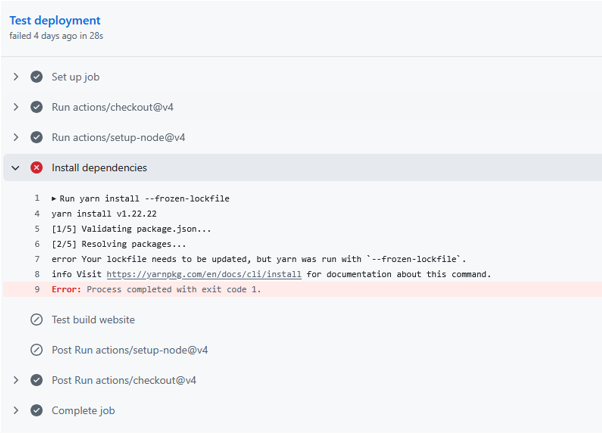
The most common cause found for this is when the test deployment attempts to run the yarn install --frozen-lockfile command and exits prematurely due to an error related to the yarn lock file.
The main cause for this is the yarn file and package.json file being out of sync. This can be caused by changes being made to the package.json file without the yarn file being regenerated, or caused by manual changes being made to the yarn file. In either case, the result leads to the test deployment for the docusaurus instance failing, which means new documentation while added to the GitHub repository, does not show on the documentation hub.
Repair Instruction:
Prerequisites:
Using the versions utilised by the repository, these are the current prerequisites:
-
Node.js >= 18.0
- Check the version with node -v or node --version
-
Yarn 1.22.22
- Install using 'npm install -g yarn@1.22.22'
- Verify with yarn -v or yarn --version
Optional Prerequisites:
The following are prerequisites only utilised by the optional steps in these instructions. If you are not planning on testing the workflow locally using Act, then you can safely ignore this.
-
Docker installed from the original creators site.
- Alternative docker packages such as docker.io will not work.
- More information on the correct version can be found on the Act GitHub page.
-
Act by Nektos for testing the CI/CD workflow
- Can be found here: https://github.com/nektos/act
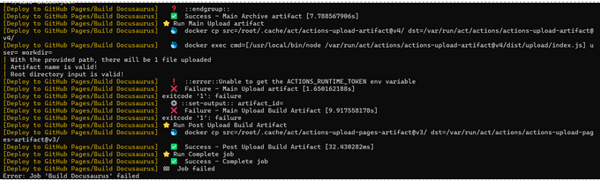
- Note that this is expected to fail towards the end of the operation as this tool cannot generate runtime tokens in the same way the actions bot can.
Steps:
Step 1: Clone the documentation repository to your local device and create a branch to work on the fixes.
Step 2: Make sure yarn is installed on your system using version 1.22.22
Step 3: Run ‘yarn install --frozen-lockfile’, the same command the CI/CD workflow uses, this should reproduce the error.

Step 4: Regenerate the yarn file using the ‘yarn install’ command (do not run this using --frozen-lockfile).

Step 5: Run the 'yarn install --frozen-lockfile' command to ensure the command now runs properly.
Step 6: Run the command 'yarn build' and confirm the project builds successfully.
Step 7 (Optional): Test the CI/CD workflow using the act tool created by Nektos. As stated in the prerequisites, this will fail towards the end.

It should generate output similar to this.
Step 8: Commit and push only the updated yarn.lock file to the repository.
With these steps completed any issues regarding this part of the CI/CD workflow for the documentation hub should be fixed. If issues persist it may be necessary to make minor changes to the package.json file, but outside major breaks that document should be left alone.